
Today I was blown away. Amazed.
Let me explain: I’ve gotten so used to doing searches from the browser bar that sometimes I forget that I couldn’t do that for my JibberJobber data. In other words, do a search for “dog food” in your browser (URL) bar and the browser returns search results from a search engine (Chrome defaults to Google, Internet Explorer defaults to Bing, etc.).
Sometimes I search for a name in my JibberJobber database expecting JibberJobber to return the results… but of course that wouldn’t work.
I asked my team to put that on our two-mile list of enhancements… and there it sits while we work on other stuff.
Today I kind of made a mistake… here’s what I did (in Chrome – this did not work on Internet Explorer or Firefox):
1. Type JibberJobber.com in the browser… instead of hitting enter, I hit the space bar.
Note: sometimes, when searching, I’ve typed JibberJobber {search phrase} in the browser… that is not the same thing. I do this to find blog posts… like this: JibberJobber webinar
When I hit the spacebar, look what my browser shows:
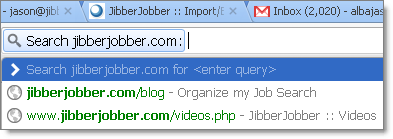
I saw that and my heart skipped a beat… could it be true? Could I really do a search on something from within the browser URL? Do you know how cool that would be? Na, it couldn’t be true.
Alas, I tried it… and this is what I got:
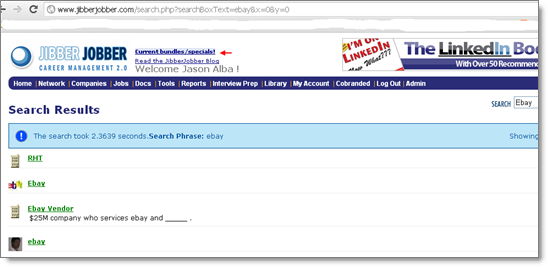
Now, if I’m looking for something, instead of going to JibberJobber and searching, I can simply open a new tab, type JibberJobber.com and hit the space bar, and put the search phrase… amazing!
This is amazing. Thank you Google and Chrome team! I LOVE THIS!
What sort of search phrases would you search for? I am not getting the utility of this.
The implication is that you could do a site search in your url/search bar in Chrome. Chrome can do this on any site, provided you have done a search on the site at least once.
It even comes with some aliases, i.e. type en and tab to search Wikipedia.
Ken is right… here’s a scenario where I do this with Google all the time.
In the olden days I would have to go to a search engine and then type in the search phrase.
Step 1: Go to Google.com, or Yahoo.com,
Step 2: type in phrase “best dog food”, hit search,
Step 3: look through the results.
Now, in most (all) browsers, I skip step 1… here’s what I do:
New Step 1: type “best dog food” in the browser bar,
New Step 2: look through the results.
The browser URL bar acts as the front page of my search engine.
I can do the same thing now with JibberJobber, or even LinkedIn … try this:
Step 1: In Chrome, in the browser URL bar, type in LinkedIn.com and hit the spacebar. The URL changes like it is in the image above…
Step 2: type in your name, or the name of a contact, or a target company, and hit enter.
You are essentially taking away the step of going to the site first, finding the search box, and clicking in it, to do a search.
Granted, you are only saving a few seconds and a few clicks, but nonetheless, you are saving time and actions, and that’s awesome. 🙂
====
David, to answer your exact question, I would search for names of people as well as company names.
I’m not seeing this in my Google Chrome when I enter jibberjobber.com and then press space bar – do you have any special extensions installed?
The preferred syntax is Example: jason alba site:jibberjobber.com
@Norman, not that I know of… I think I am on the latest version of Chrome. Check out this blog post, where it says to do a TAB (instead of a space)… perhaps better instructions: https://blog.xmlgadgets.com/google/search-any-website-from-google-chromes-address-bar-directly/
@David, that is syntax you should be able to use from the google search box… I’m guessing it would also work from the URL bar, but I’m talking about a different function.
@Norman – In order for it to work also, you need to make sure you have used the search functionality of a website at least once before. Hope that helps!