
Whew! Did you make it through the last two posts on what Degrees of Separation are? I thought it was pretty simple, until Lamar challenged my thinking, which is why I wrote these posts.
Post 1: The Most Important Networking Question: “Who do you know…” (Degrees of Separation)
Post 2: 1st and 2nd Degree of Separation vs 3rd and 4th Degree of Separation: What’s the Difference?
Post 3: THIS ONE 🙂
Here’s how we keep track of this in JibberJobber.
When you add a Contact, you’ll see the Referred By field. If you don’t have many Contacts (a few hundred?), you’ll see them in a drop down. If you have a lot, you have a blank field… but once you start typing a name, we show you all possible hits:
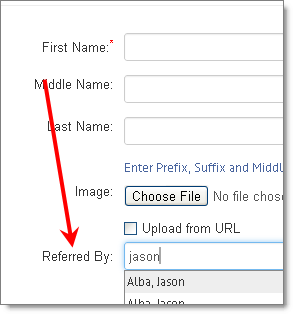
So I fill this in… and it automatically assigns it a Degree of Separation, based on who referred that contact to you.
Then, you can see your network in a “Tree View,” like this:
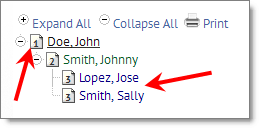
On the left you’ll see the Degrees, in an icon. John is a 1st Degree Contact, and you can see he introduced me to Johnny (2nd Degree), who introduced me to two people: Jose and Sally (both 3rd Degree Contacts).
The right is pointing at multiple introductions from one person…
Is this powerful or WHAT?
Seriously cool folks. Where else can you see something like this?