
On the JibberJobber user webinar on Wednesday I had a number of people ask how to import contacts from other systems, including Verizon (that was a first) and Facebook (it’s been a while since anyone asked that.
The bottom line is that you can import any CSV file. You just have to figure out how to export your contacts from any of those systems.
The first place I would start is on a Google search, which would look like this:
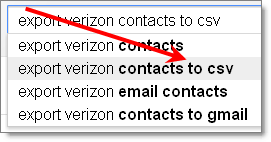
Just change “verizon” for whatever system you are looking for… here are a few exports you might be interested in:
- export verizon contacts to a csv
- export yahoo contacts to csv
- export gmail contacts to csv
- export cardscan contacts to csv
- export aol contacts to csv
- export facebook contacts to csv
Get the point?
What do you do once you export? As long as you remember a csv is simply a file that opens with Microsoft Excel (ie, it’s just a spreadsheet (kind of)), you should be good. I do the following:
- Open the file (in Excel).
- Clean the file. If it’s coming from LinkedIn, I delete about 20+ blank columns. If it’s coming from other places (like those above), I am not sure what you get. You don’t have to delete/clean anything, but I’m a nerd for good data, and I like to clean it in the spreadsheet rather than one-by-one in JibberJobber. This could include making sure the Last Name column only has LAST NAMES, not acronyms, etc.
- Add new columns. If nothing else, add a column titled SOURCE, and then for every record put in _______-Import. For example, I regularly have contacts with a source of “LinkedIn_Import”, which allows me to know I’ve imported them from LinkedIn. Other columns you might want to add are: tags, notes, rank, initial_contact, birthday, and any user defined fields you have set up in JibberJobber.
- Save the file. Make sure you SAVE AS a csv file.
Then, go to JibberJobber and import. You get there by mousing over the Network drop down and then clicking import/export. More details on that in a later post.
Hope this helps…
Any plans of automating the integration/connection to FB, LinkedIn the way SimplyHired does?